Let’s learn in this practical Guide how to analyze server log files, build decisions on these data and validate the behavior of bots on your website for better Technical SEO.
What Are Server Log Files?
Server Log Files are plain text files which contains the information about how your webserver responds to users and bots, Server Log files shows you in at which time a specific bot requested a specific page and what the response the webserver responded with.
Traditionally, server log files usually looks like this :
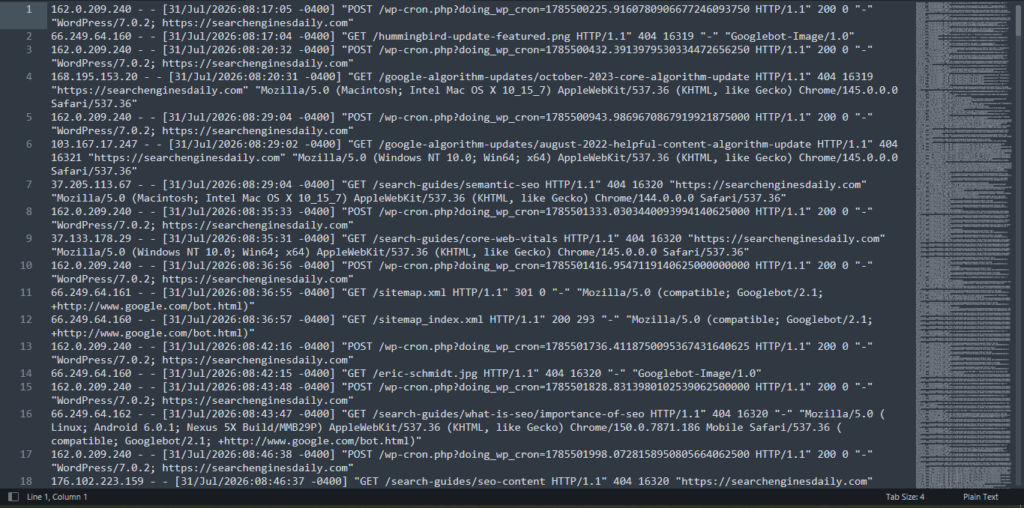
Reading this image into plain English, each line follows the same pattern no matter which server software generated it. It’s called the Combined Log Format, and once you can read one line, you can read all of them.
Take line 2: 66.249.64.160 - - [31/Jul/2026:08:17:04 -0400] "GET /hummingbird-update-featured.png HTTP/1.1" 200 0 "-" "Googlebot-Image/1.0"
Break it into its pieces:
The IP address (66.249.64.160) tells you who actually made the request. This is the single most important field in the whole line, because anyone can lie about who they are further down the line, but they can’t easily lie about where the request actually came from.
The timestamp ([31/Jul/2026:08:17:04 -0400]) tells you exactly when the request hit your server, down to the second, including your server’s timezone offset.
Line these up across thousands of rows and you start seeing crawl patterns: how often Googlebot comes back, what time of day it’s most active, whether it crawls in short bursts or spreads itself out evenly.
The request line (“GET /hummingbird-update-featured.png HTTP/1.1”) gives you the method (GET for fetching a page or file, POST for submitting data), the exact path requested, and the protocol version.
The status code (200) is what your server answered with. 200 means it served the page fine.
You’ll also run into 404 (not found), 301 (permanent redirect), 500 (server error), and a few others. This one field alone will tell you most of what’s wrong with your crawl health before you look at anything else.
The bytes transferred (0 in this case) is the size of the response.
The referrer (“-“) tells you what page or source sent the request, when one was sent. A dash means no referrer, which is completely normal for bots.
The user agent (“Googlebot-Image/1.0”) is the string identifying who’s making the request. Notice Google’s image crawler identifies itself separately from the regular Googlebot.
Worth remembering, because it crawls on its own schedule and for its own purpose, and if you lump it together with regular Googlebot activity in your analysis, you’ll draw the wrong conclusions.
Once you can read that, the rest of the log file opens right up.
The noise you need to filter out first
Before you analyze anything, filter out your own site talking to itself. Look at lines 1, 3, 5, 8, 10, 13, 15, and 17 in the sample above.
Every one of them is a POST request to /wp-cron.php with a “WordPress/7.0.2” user agent and the site’s own URL as referrer. That’s not a bot and it’s not a crawler.
It’s WordPress’s built-in cron system pinging itself every few minutes to run scheduled tasks like publishing queued posts or checking for plugin updates.
If you don’t strip these out first, they’ll flood your log analysis and make it look like your site gets far more activity than it actually does.
Every log analysis should start with one question: is this a real visit, or is it the server talking to itself. On a WordPress site, wp-cron.php lines are always the answer to that question.
Reading the real signal: what the 404s are telling you
Once the noise is gone, look at what’s left. In this same log, six separate requests come back with a 404:
/google-algorithm-updates/october-2023-core-algorithm-update
/google-algorithm-updates/august-2022-helpful-content-algorithm-update
/search-guides/semantic-seo
/search-guides/core-web-vitals
/eric-schmidt.jpg
/search-guides/what-is-seo/importance-of-seo
/search-guides/seo-content
This is where log analysis actually earns its keep, because a 404 on its own doesn’t tell you much. What matters is who’s hitting it and how they got there.
Check the referrer field. Several of these 404s carry “https://digest.searchenginesdaily.com” as the referrer, which means something live on the site is linking to a URL that doesn’t exist, or doesn’t exist at that exact path anymore.
That’s not a bot problem, that’s a broken internal link, and it’s hitting real visitors too, not just crawlers, because some of these requests are coming from ordinary Chrome browsers on desktop and mobile, no bot involved at all.
Then look at the ones with no referrer, like /eric-schmidt.jpg being requested by Googlebot-Image, or /search-guides/what-is-seo/importance-of-seo being requested by a mobile Googlebot user agent.
No referrer means Google isn’t following a link on your current pages, it’s requesting a URL it already knows about from somewhere else: an old sitemap entry, a cached version of a page, an internal link that used to exist, or a backlink from another site pointing at a URL you’ve since renamed or removed.
The fix is different in each case. Internal 404s linked from your own site get fixed by correcting the link at the source.
External or bot-remembered 404s for content that genuinely moved get a 301 redirect to the current equivalent page.
URLs that never should exist and aren’t linked from anywhere anymore, you can usually leave as clean 404s, since redirecting every dead URL to your homepage just to “save” it is a common mistake that dilutes relevance signals instead of helping them.
Confirming a bot is actually a bot
This is the part most people skip, and it’s the part that actually validates bot behavior instead of assuming it.
A user agent string is just text.
Anyone writing a scraper can set it to say “Googlebot/2.1” without being anywhere near Google’s infrastructure. If you’re making blocking rules, crawl budget decisions, or firewall configs based on the user agent string alone, you’re trusting a field that takes seconds to fake.
The IP address is what you actually verify. Google publishes its crawler IP ranges, and Googlebot traffic consistently comes from known blocks, 66.249.64.0/19 among them.
In the sample log, all three Googlebot requests come from 66.249.64.160, .161, and .162, which sit inside that verified range. That’s how you know this is genuinely Google and not an impersonator wearing its name.
The correct way to check this at scale is forward-confirmed reverse DNS.
Take the IP, run a reverse DNS lookup on it, and it should resolve to a hostname ending in googlebot.com or google.com. Then run a forward DNS lookup on that hostname, and it needs to resolve right back to the same IP you started with.
If both directions match, the bot is real. If the reverse lookup returns something unrelated, or the forward lookup doesn’t match, you’re looking at a spoofed user agent, and you can block that IP without any risk of losing real Google crawl coverage.
This matters more than it looks on paper, because scraper traffic disguised as Googlebot is common, especially on sites that publish frequently, like news and content sites.
Block based on user agent alone and real scrapers walk straight through, while a badly written rule risks blocking real Googlebot by mistake.
Turning log data into actual decisions
Once the noise is filtered and the bots are verified, the log file stops being a wall of text and starts being a decision-making tool.
Fix or redirect the URLs bots keep requesting that return 404, especially the ones with no referrer, since that tells you the URL exists somewhere outside your current site structure and Google hasn’t forgotten it yet.
Compare crawl frequency between Googlebot and Googlebot-Image separately.
They don’t run on the same schedule, and treating them as one crawler gives you a distorted picture of how often your content actually gets revisited.
Check your sitemap redirect chain. In this log, /sitemap.xml returns a 301 straight to /sitemap_index.xml, which returns a 200.
That’s normal behavior for most SEO plugins, but it’s worth confirming that’s the exact chain Search Console sees too, since a broken or looping sitemap redirect is something you’d rather catch in your logs than find out about from a sudden drop in indexed pages.
Watch for crawl budget going to dead ends. Every request Googlebot spends on a 404 or a redirect chain is a request it didn’t spend on a page you actually want indexed. On a site publishing daily, that adds up faster than you’d think.
For pulling the logs themselves, most hosting panels give you raw access logs directly, and if you’re on Cloudflare, Logpush gets you the same data at the edge.
For quick filtering, grep and awk on the command line get you further than people expect, something as simple as grep “Googlebot” access.log | grep ” 404 ” hands you exactly the list you need to start fixing.
Past a few thousand lines a day, a dedicated log analyzer saves you the manual work and lets you segment by bot type, status code, and directory automatically, instead of scrolling through raw text trying to spot patterns by eye.
Related Guides :